1. Overview
| Developer | SkrenBytes |
| Type | Browser Extension |
| Platform | Google Chrome |
| Category | Security |
| Status | Coming Soon |
| License | Proprietary |
Header Guard is a Google Chrome extension developed by SkrenBytes that inspects the HTTP response headers of any website you visit and instantly assigns a security grade - from A (excellent) to F (poor), based on industry-recognised security best practices.
Most users never think about HTTP headers, yet these behind-the-scenes directives tell a browser how to behave: whether to allow the page inside an iframe, whether scripts can be loaded from untrusted sources, and whether traffic must be encrypted. Misconfigured or missing headers are among the most common and preventable attack vectors on the web.
Header Guard makes the invisible visible - turning complex HTTP security headers into a clear, actionable letter grade, directly in your browser toolbar.
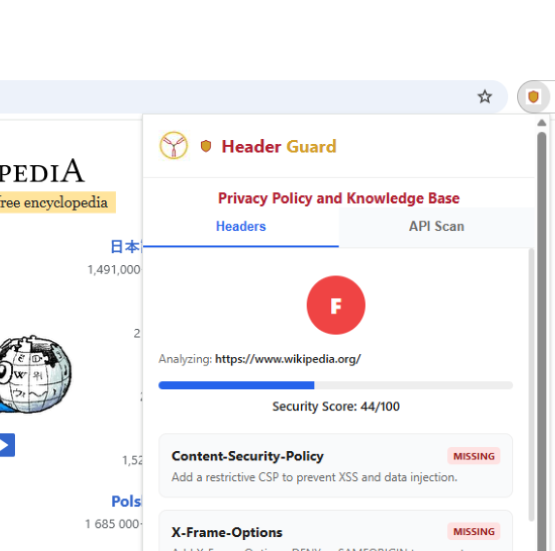
With a single click, Header Guard surfaces which headers are present, which are missing, and what impact each has on the overall security score.
2. How to Download
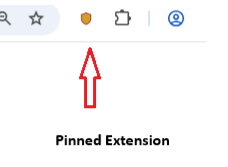
Header Guard will be available on the Chrome Web Store. Follow the steps below once the extension is live.
3. Understanding the Score & Grade for Header Scan
Header Guard evaluates each security header individually, applies weighted scoring, and produces an overall score between 0 and 100 which maps to a letter grade:
| Score | Grade | Rating | Recommended Action |
|---|---|---|---|
| 90 – 100 | A | Excellent | Maintain and monitor regularly |
| 80 – 89 | B | Good | Address remaining low-priority gaps |
| 70 – 79 | C | Average | Review and fix missing headers |
| 60 – 69 | D | Weak | Prioritise fixes urgently |
| 50 – 59 | E | Very Weak | Immediate remediation required |
| 0 – 49 | F | Poor / Insecure | Escalate to security team now |
Grades are calculated in real time as you browse. Refreshing a page re-evaluates the headers. You may see changes after a site updates its configuration.
4. How It Works – Header Scan
When you navigate to a website, your browser and the server exchange HTTP messages. The server's response includes response headers - metadata that instructs the browser on security policies. Header Guard intercepts these headers via Chrome's webRequest API, parses them, and runs each through a scoring engine.
Headers Checked
Content-Security-Policy
Restricts where scripts, images, and resources may load from — blocking XSS and injection attacks.
🔗 OWASP ReferenceStrict-Transport-Security
Forces browsers to use HTTPS exclusively, preventing protocol downgrade and man-in-the-middle attacks.
🔗 OWASP ReferenceX-Frame-Options
Controls whether the page can be embedded in an iframe, protecting against clickjacking attacks.
🔗 OWASP ReferenceX-Content-Type-Options
Prevents browsers from MIME-sniffing responses, reducing the risk of drive-by download attacks.
🔗 OWASP ReferenceReferrer-Policy
Governs how much referrer information is shared with other sites, protecting user privacy across navigations.
🔗 OWASP ReferencePermissions-Policy
Limits browser feature access — camera, microphone, geolocation — for the page and embedded content.
🔗 OWASP Reference5. How It Works – API Scan
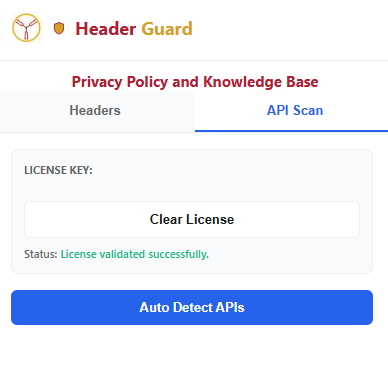
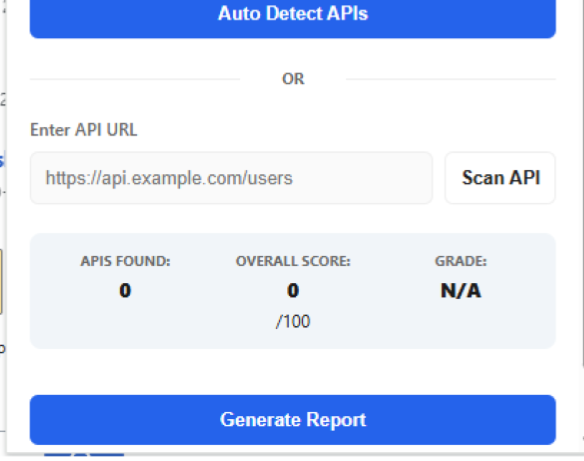
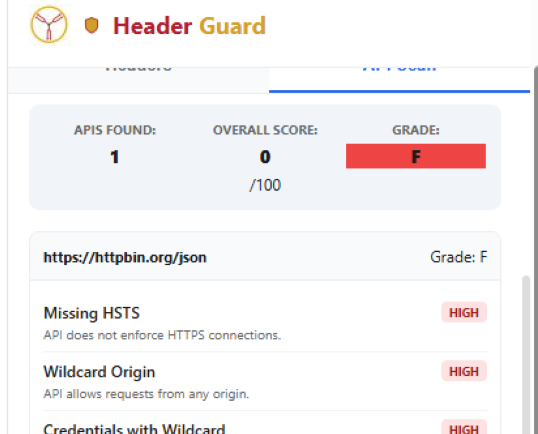
The API Scan feature allows users to analyze API endpoints for common security weaknesses. The scan runs only when the user manually starts it.
The extension does not scan automatically. The user must provide an API endpoint or choose automatic detection.
API Scan Options
The extension supports two scanning modes:
🔍 Automatic API Detection
Detects API calls from the current webpage, lists discovered API endpoints, and lets the user select an endpoint to scan.
✎ Manual API Scan
User enters an API endpoint URL directly. Example: https://api.example.com/users
Running an API Scan
API Scan Coverage
| Area | Full Pentest Tool | Header Guard | Coverage |
|---|---|---|---|
| API Discovery | Full mapping | Basic detection | ~50% |
| Security Headers | Full | Partial | ~80% |
| Authentication Testing | Deep testing | Detection only | ~30% |
| Data Exposure | Deep analysis | Basic checks | ~60% |
| Token Security | Deep testing | Detection only | ~25% |
| Exploitation | Full | None | 0% |
| Business Logic | Full | None | 0% |
This tool provides a lightweight API security assessment and does not replace a full penetration test. The API Scan feature covers approximately 40%–50% of a typical API security assessment.
6. Buying API Keys
To purchase an API key for Header Guard, follow the steps below:
7. Tips to Improve Your Score
If your site scores below an A, the following best practices will help close the gap. Each tip links to the relevant OWASP guidance for developers.
- Implement a strict Content-Security-Policy. Define explicit allowed sources for scripts, styles, and media. Avoid🔗 OWASP — CSP Cheat Sheet
unsafe-inlineandunsafe-evalwherever possible. - Enable HSTS with a long max-age. Set🔗 OWASP — HSTS Cheat Sheet
max-age=31536000; includeSubDomains; preloadand submit your domain to the HSTS preload list. - Add X-Frame-Options: DENY or SAMEORIGIN to prevent your pages from being framed on malicious third-party sites and defend against clickjacking.🔗 OWASP — Clickjacking Defence
- Set X-Content-Type-Options: nosniff — a one-liner that prevents MIME confusion attacks with essentially zero performance cost.🔗 OWASP — Secure Headers Project
- Choose a restrictive Referrer-Policy such as🔗 OWASP — HTTP Headers Cheat Sheet
no-referrerorstrict-origin-when-cross-originto limit information leakage on outbound links. - Define a Permissions-Policy that explicitly disables browser features your site does not use (camera, microphone, geolocation) to reduce the attack surface.🔗 OWASP — HTTP Headers Cheat Sheet
- Test after every deployment. Header configurations can be overwritten by CMS updates, CDN changes, or server migrations — re-check with Header Guard regularly.🔗 OWASP — Secure Headers Project
8. Product Gallery
A quick look at Header Guard in action. Hover over the images to pause the carousel.
Ready to Check Your Site's Security?
Install Header Guard and get your security grade in seconds — no sign-up, no data collection, no noise.
⇓ Get Your Header Guard Today